We have master creating HTML code using AI Chatbots!
Next is having it create code using Python.
I asked Gemini for the advantages of using Python when Vibe Coding and this was its response:
Python is the “native language” of vibe coding because it prioritizes intent over syntax. Here is why it works so well:
- Readable & Concise: Python looks like English. Because it requires less “boilerplate” code, the AI can generate entire features in seconds without getting confused by its own length.
- AI “Fluency”: AI models are trained more heavily on Python than almost any other language. This means the AI is less likely to hallucinate and more likely to give you working code on the first try.
- Instant Feedback: Since Python is interpreted (not compiled), you can run it immediately, catch an error, and feed it back to the AI for a “vibe check” in a fast, continuous loop.
- Infinite Plugins: If you want your app to do something specific—like analyze a PDF or generate an image—there is already a Python library for it. You’re just “plugging in” existing tools rather than building them from scratch.
- Low Friction: You don’t have to worry about complex computer memory rules or semicolons. This lets you focus on what the app should do rather than how the computer processes it.
In short: Python stays out of the way, letting you and the AI focus entirely on the logic and the “vibe.”
It is easy, not as easy as html, and it is limited, creating .exe files is easier using Visual Studio and C# in my opionin.
So why did I go down the python path, well because I want to deploy on Raspberry PI devices, and python is perfect for that!
Let start on the windows desktop though, for ease of use.
Another thing I learned was how to prompt ai to give me all the info I need without knowing actually “How-To” .
Here is a prompt structure, with specific instructions that has served me well:
Create a step by step guide, writing a “Hello World” program in Python, use IDLE, on my Windows desktop pc, assume the reader has zero knowledge of Python and or this project.
The portion “Assume the reader has zero knowledge…” is critical.
Put that prompt into Claude, no need to create a project for something this simple! IDLE is the built in Python dev IDE.
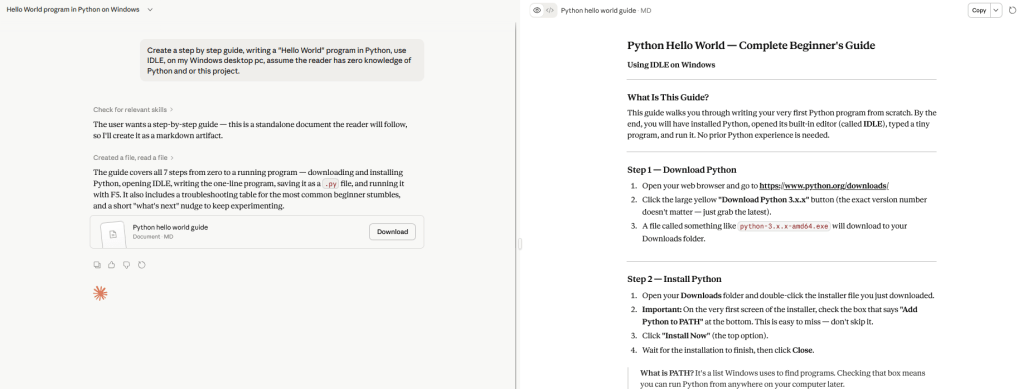
Pretty impressiuve results, the only thing to do now is follow the instructions.
Odds are there will be errors in some of the codes, or hiccups.
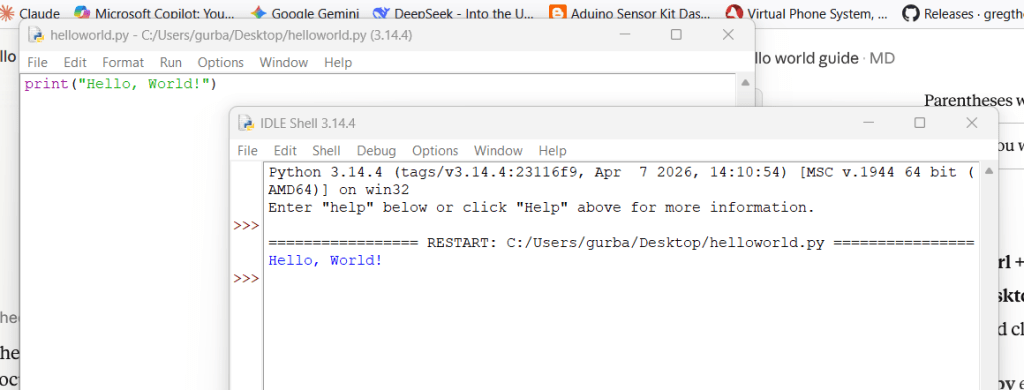
Works as advertised!
As always click below to download the files I created.

 My Vibe Coding Projects